LG ThinQ washer app errors fall into two distinct categories: soft errors that resolve with a power cycle, load adjustment, or filter cleaning, and hard errors that indicate a component has failed and will not self-resolve. OE, UE, and dE errors are frequently soft faults caused by clogged drain filters, unbalanced loads, or laundry caught in the door gasket. CE, tE, AE, LE (when persistent), and FO errors almost always signal a real mechanical or electrical failure that requires a professional technician. Running the LG ThinQ Smart Diagnosis feature before calling for service identifies which category your error falls into and can save Naperville homeowners an unnecessary service call or, conversely, alert them that delaying repair will make the problem worse.
How the LG ThinQ App Communicates Washer Problems
LG ThinQ washers, including front-load models in the WM9000HBA, WM6500HBA, and WKEX200HBA WashTower lines as well as top-load models with Direct Drive and AI DD motor technology, communicate appliance status to the companion ThinQ app in real time. When a problem occurs during a wash cycle, the error code appears simultaneously on the washer’s control panel display and as a push notification in the ThinQ app on your phone.
What makes the ThinQ app more useful than simply reading the display code is the Smart Diagnosis feature. When you run Smart Diagnosis through the LG ThinQ app, the washer transmits comprehensive diagnostic data that provides context the simple error code alone cannot convey, including when the error first appeared, how many cycles have run since, whether related anomalies exist, and what operating conditions were present when the fault occurred. This level of detail is the difference between knowing a drain error happened and knowing whether the error is from a blocked filter, a kinked hose, or a failing pump motor.

For Naperville homeowners, that diagnostic capability has real financial value. An OE drain error caused by a clogged filter costs nothing to fix and requires no service call. An OE drain error caused by a failing pump motor on a five-year-old washer requires professional repair and costs $150 to $300. The ThinQ app’s Smart Diagnosis distinguishes between these scenarios before you pick up the phone.
How to Run Smart Diagnosis Correctly
Getting accurate results from Smart Diagnosis requires a specific setup that many homeowners skip, which is why the feature sometimes produces unhelpful or incomplete results.
Ensure your smartphone connects to the same WiFi network as the washer and has strong signal strength. Update the LG ThinQ app to the latest version before running diagnosis. Have your washer’s model number ready, located inside the door frame or on the back panel. Clear the area around the washer so you can access the control panel and hold your phone near it comfortably.
To initiate Smart Diagnosis through the app, open ThinQ, select your washer from the home screen, and tap the Smart Diagnosis option. The washer will transmit a series of audio tones that the app decodes using pattern recognition. The ThinQ app will display the details of your washer’s performance and indicate any issues that require attention.
For washers that support it, the app also provides access to a manual diagnostic mode. Power on the washer with an empty drum, then press and hold Spin Speed and Soil Level simultaneously for 3 seconds. The washer enters diagnostic mode and cycles through motor, fill, drain, and spin tests. To exit diagnostic mode, press Power or unplug the unit. This test sequence is particularly useful for distinguishing between sensor failures and mechanical failures in components like the drain pump and door lock, since each test segment runs independently and a failure in one segment points directly to that system.
For LG washers without WiFi connectivity, the legacy Smart Diagnosis method still works. Hold your phone’s speaker close to the washer’s power button area, then press and hold the Temp button on the washer while keeping the phone in place. The washer transmits an audio signal that LG’s support line can decode at 1-800-243-0000.
Error Code Categories: Which Ones Are Self-Fixable and Which Are Not
LG uses an alphanumeric code structure across all washer models, and understanding the category each code belongs to is the fastest path to knowing whether you need a technician.
Door and lid errors such as dE, dE1, and dE2 signal that safety interlocks cannot verify proper door closure. Motor and drive errors including LE, 3E, and CE indicate problems with the motor system that rotates the drum. Temperature and sensor errors such as tE variants and PE point to heating system failures or sensor malfunctions. Control and communication errors including EE, AE, and FO involve the electronic control systems and typically require professional service.
OE Error: Drain Problem
The OE error is the single most common error code on LG front-load washers, and the majority of OE errors are self-resolvable without any professional service.
The most frequent cause is a clogged drain pump filter where coins, hair ties, lint, and small objects accumulate and block water flow. A kinked or clogged drain hose is the second most common cause. A faulty drain pump motor that fails after five to eight years of use is the less common but more serious cause.
The drain pump filter on LG front-load washers is accessible behind a small access panel at the lower front of the machine. It should be cleaned monthly. Naperville homeowners who have never cleaned it, or who have not cleaned it in more than a year, will find that clearing the filter resolves the OE error entirely in the majority of cases.
Self-fix first: Unplug the washer, locate the access panel at the lower front, place a towel under it to catch water, slowly turn the filter cap counterclockwise to drain residual water, remove the filter completely, clear all debris, rinse under running water, reinsert securely, and run an empty spin cycle to confirm the error has cleared.
When to call a Naperville technician: If the OE error returns within one or two cycles after a thorough filter cleaning, and the drain hose is not kinked or blocked, the drain pump motor is the most likely cause. The drain pump motor part number 4681EA2001T fails after five to eight years of use and is unable to expel water within the ten-minute drain window LG’s control board allows before triggering OE. Pump motor replacement runs $150 to $300 in parts and labor and is a straightforward repair for a certified technician.
UE and UB Errors: Unbalanced Load
The UE and UB errors both indicate an unbalanced drum during the spin cycle, and the distinction between them matters. UB is a temporary warning that the washer detected imbalance and is attempting to self-correct by redistributing the load through additional water and drum movement. You do not need to intervene. UE is displayed when the washer has attempted to self-correct and failed, at which point manual intervention is required.
To fix a UE error, redistribute the clothes in the drum and make sure they are evenly distributed. Check that the washing machine is level and adjust the feet if necessary. Smaller loads tend to cause this error more often than full loads.
The mechanical story behind a persistent UE error that occurs even on well-distributed, small loads is more serious. Suspension springs that are broken or detached prevent the drum from moving freely during rebalancing attempts. Shock absorber failure allows excessive drum movement during spinning. Drum support issues like broken spider arms or failed drum bearings create mechanical resistance that prevents smooth rotation and require professional diagnosis and repair.
Self-fix first: Stop the cycle, open the door, physically redistribute the laundry so no heavy items are clumped together, close the door firmly, and restart the spin cycle. Add one or two towels if you are washing a single heavy item to improve balance distribution.
When to call a Naperville technician: A UE error that occurs consistently on balanced loads, or when the drum makes squealing or grinding sounds during manual rotation with the power off, indicates bearing, shock absorber, or suspension failure rather than a load distribution issue. Bearing replacement on LG front-load washers runs $250 to $450 and requires significant disassembly. Shock absorber replacement runs $100 to $200. Both require professional service.
dE, dE1, and dE2 Errors: Door Lock Problems
These three codes all relate to the door lock mechanism but indicate slightly different failure points that determine whether the fix is owner-level or technician-level.
A dE error code indicates that the washer door was unable to lock and can normally be resolved by performing a simple reset. A dE1 error code indicates that the door is not closed properly, which can be caused by laundry caught between the washing machine door and the rubber door gasket. A dE2 error code indicates that the door is closed but not locked, which can be caused by too much laundry, items stuck in the gasket, or a bent or broken door latch.
Self-fix first: Check the door gasket carefully for any laundry, small garments, or debris caught in the rubber seal. Unplug the washer, press and hold the START/PAUSE button for 5 seconds to fully discharge the door lock circuit, then plug back in and attempt the cycle. If the dE1 error code persists after this reset, close the water tap and unplug the washer, as the unit will require repair service.
When to call a Naperville technician: A dE or dE1 that persists after a clean gasket check and a full power cycle reset points to the door latch mechanism or the door lock actuator assembly. Door lock replacement on LG front-load washers costs $80 to $150 in parts and labor and is one of the more common wear items on washers used heavily for five or more years.
LE Error: Motor Locked
The LE error indicates the drum motor has locked and cannot achieve 20 RPM within the control board’s three-minute window. The range of causes is wide, which makes the diagnostic step before calling a technician particularly important for this code.
LE can range from a simple overload to a failed hall sensor costing $90 to $140 total, or seized bearings costing $250 to $450. Try reducing the load first. If LE persists, turn the drum by hand to check for free rotation.
If LE appears only with full loads but clears with small loads, the washer is being consistently overloaded and load sizes need to be reduced. If LE appears even with tiny loads and the drum shows resistance when rotated manually, bearing failure, motor problems, or jammed foreign objects requiring professional diagnosis are the likely cause.
Self-fix first: Unplug the washer. Open the door and manually rotate the drum by hand. If it rotates smoothly without resistance, the LE error was caused by overloading. Remove half the laundry, restart the cycle, and monitor. If the drum does not rotate freely or requires noticeable effort, stop and call for service.
When to call a Naperville technician: A drum that resists manual rotation, grinding or squealing sounds during the rotation check, or an LE error that appears on all load sizes regardless of how much laundry is in the drum all indicate motor, hall sensor, or bearing failure. Hall sensor replacement resolves LE about 60 percent of the time and costs $90 to $140 total. Bearing failure requires $250 to $450 in professional service.
tE Error: Heating System Failure
The tE error code indicates a heating error, usually caused by a faulty thermistor.</cite> On LG washers with internal heating elements for sanitize and hot wash cycles, the thermistor monitors water temperature and communicates with the control board. A failed thermistor produces inaccurate temperature readings that the board interprets as a heating system fault, even when the heating element itself is functioning normally.
The tE error is consistently in the technician-required category. The thermistor itself is an inexpensive component, but accessing it requires partial washer disassembly and testing with a multimeter to confirm the resistance readings are out of specification. In cases where the thermistor tests normal, the heating element or the control board communication path is the actual fault, which also requires professional diagnosis.
When to call a Naperville technician: Every time you see a tE error, unless it appears once after a power surge and never returns. A tE error that appears consistently across multiple cycles or that returns after a power cycle reset requires a certified technician with LG diagnostic tools to determine whether the thermistor, heating element, or control board is the root cause.
PE Error: Water Level Sensor Failure
The PE error code indicates that the water level sensor is malfunctioning. The pressure switch, also called the water level sensor or pressure sensor, monitors how much water is in the drum and communicates with the control board to regulate fill cycles. A failed sensor can cause the washer to overfill, underfill, or stop mid-cycle as the board receives readings it cannot interpret as normal.
PE is another code that falls cleanly in the technician-required category for persistent occurrences. A one-time PE following a power interruption may clear after a power cycle. A PE that returns across multiple cycles indicates the sensor has failed or the air hose connecting the sensor to the drum has cracked or disconnected.
CE Error: Motor Overcurrent
The CE error code indicates that there has been an overcurrent in the electrical circuit of the motor, caused by a short circuit, loose connection, ground fault, or power surge. This is one of the most serious error codes on an LG washer because it involves the electrical system of the drive motor and can indicate a developing failure that, if ignored, escalates from a motor fault to a control board fault as the overcurrent stress damages secondary components.
CE indicates the unit is not able to rotate properly and requires a call to a technician. There is no owner-level fix for a CE error beyond a single power cycle to confirm the code was not triggered by a momentary power surge. If CE returns after a power cycle, unplug the washer and call for service immediately.
AE Error: Internal Leak Detected
AE indicates water in the base pan. Turn off the washer and water supply immediately. Tilt the washer back carefully to drain the base pan. Professional diagnosis is needed to identify the exact leak source.
The AE error is one of the most urgent codes on the LG error code list because it indicates the washer has detected water pooling in its base, which means an internal leak is already in progress. The leak source could be the door gasket, the drum seal, a supply hose connection, or the pump. Each requires a different repair approach, but all require professional diagnosis to identify accurately.
For Naperville homeowners, the secondary risk of an AE error is water damage to the laundry room floor, subfloor, and any cabinetry adjacent to the washer. Turning off the water supply and power immediately and calling for same-day service limits that secondary damage.
FO Error: Control Board Communication Failure
The FO error indicates a breakdown in communication between the main control board and the user interface board. Either the main board, UI board, or the ribbon cable connecting them has failed. Diagnosis determines which component needs replacement, with costs ranging from $300 to $500 depending on which board failed.
Control board failures are always technician-required territory. The diagnostic process requires LG-specific test equipment to determine whether the main board, the UI board, or the ribbon cable is the actual failure point, since all three produce the same visible symptom. Replacing the wrong board without proper diagnosis wastes money and does not resolve the error.
ThinQ App WiFi Errors vs. Mechanical Errors: Knowing the Difference
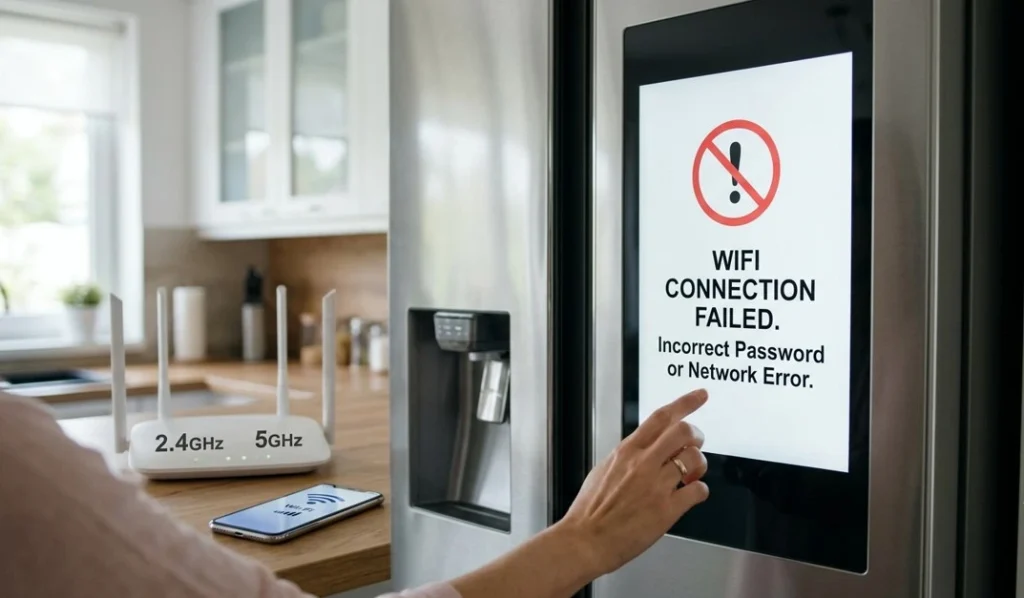
The ThinQ app displays two distinct types of notifications that Naperville homeowners should not conflate. Mechanical error codes, such as OE, LE, CE, and tE, reflect problems inside the washer’s physical components. App connectivity errors reflect problems with the WiFi connection between the washer and the phone, not with the washer’s mechanical systems.
The most common ThinQ app WiFi errors include Error Code 001 for an incorrect WiFi password, Error Code 002 for no network detected, Error Code 005 for connection timeout when the washer is too far from the router, and Error Code 007 for a server issue requiring the app to be reinstalled or tried again later.
LG washers connect exclusively on the 2.4 GHz band, not 5 GHz. If your router uses a combined band under a single network name, the washer may fail to establish or maintain a WiFi connection even when the password is correct. Separating the 2.4 GHz network in your router’s settings and reconnecting the washer through ThinQ resolves the majority of persistent WiFi app errors without any involvement from a technician.
A washer that shows WiFi connectivity errors in the ThinQ app but runs cycles normally is a network configuration issue, not an appliance problem. A washer that shows WiFi errors and also will not complete cycles is displaying two separate problems simultaneously, one connectivity and one mechanical, and the mechanical issue requires professional diagnosis regardless of the WiFi status.
The LG ThinQ Washer Error Code Reference: Quick Decision Guide
Here is a plain-language summary of every major error code and the correct first response for Naperville homeowners, informed by LG’s official washer error code documentation and EasyBear’s comprehensive repair cost data for LG washers.
OE — Drain error. Clean the pump filter first. If it returns, call a technician. Drain pump repair costs $150 to $300.
UE or UB — Unbalanced load. Redistribute laundry and retry. If it occurs on empty or small loads, call a technician. Suspension or bearing repair costs $100 to $450 depending on the failed component.
dE — Door lock error. Check the gasket for trapped laundry and reset. If persistent, call a technician. Door lock replacement costs $80 to $150.
dE1 — Door open and unlocked. Same approach as dE. Persistent dE1 requires service.
dE2 — Door closed but not locked. Check for a bent or broken latch. Persistent dE2 requires service.
LE — Motor locked. Reduce load size and retry. If persistent or if the drum resists manual rotation, call a technician. Hall sensor costs $90 to $140; bearing repair costs $250 to $450.
tE — Heating system or thermistor failure. Always requires a technician unless it appears once after a power surge and does not return.
PE — Water level sensor failure. A power cycle may clear a one-time occurrence. Persistent PE requires a technician.
CE — Motor overcurrent. Power cycle once. If it returns, unplug and call immediately.
FE — Washer overfilling. Turn off water supply. Usually a faulty water inlet valve requiring technician service.
AE — Internal leak detected. Turn off water and power immediately. Requires same-day service.
FO — Control board communication failure. Always requires a technician. Control board replacement costs $300 to $500.
SUD — Excess suds. Use HE detergent only. Washer will automatically run a de-sudsing cycle. No service needed.
CL — Child lock active. Not an error. Press and hold the Child Lock button combination to deactivate.
PF — Power failure during cycle. Restart the cycle. If persistent, the power supply circuit or control board needs inspection.
How Smart Diagnosis Changes the Repair Decision
The single most valuable capability LG ThinQ gives Naperville homeowners is the ability to differentiate between a component failure and an operational error before deciding whether to call for service. Smart Diagnosis provides component stress testing measuring how hard components are working, vibration analysis detecting unusual movement patterns, water flow measurements verifying fill and drain rates, and motor performance data tracking motor current draw, speed accuracy, and efficiency.
Running Smart Diagnosis takes less than five minutes and produces results that take the guesswork out of the repair decision. If the app identifies a drain pump stress level outside normal parameters after a drain filter that appears clean, you know the pump motor is developing a fault and a proactive service call prevents an OE error mid-cycle in the near future. If the app shows all systems within normal parameters after a UE error, you know the issue was load distribution and no service call is needed.
The full LG Smart Diagnosis guide for washers walks through the complete feature set and how to interpret the results. Running it before any service call, and bringing the diagnostic summary to your technician appointment, accelerates the in-person diagnostic process and reduces the time a technician spends identifying what the app has already flagged.
When to Stop Troubleshooting and Call a Naperville Technician
The error codes that should prompt an immediate call rather than any further DIY troubleshooting are CE, AE, and FO. These three codes involve electrical overcurrent, active internal leaks, and control board failures, respectively. Continuing to operate the washer with any of these errors active risks secondary damage to other components or water damage to the laundry room.
For all other error codes, the sequence is clear: attempt the owner-level fix appropriate to the specific code, run Smart Diagnosis through the ThinQ app, and then make the service call decision based on whether the code persists after the fix and what the Smart Diagnosis results show.
For Naperville homeowners whose LG ThinQ washer is showing a persistent error that has not responded to the appropriate owner-level fix, the washer repair team at Naperville Appliance Fix is certified on LG ThinQ models including Direct Drive front-load washers, top-load models, and WashTower units. Same-day diagnostic appointments are available across all Naperville zip codes, with upfront pricing before any repair work begins.
For help diagnosing an LG ThinQ app error that does not match any of the descriptions above, or to schedule service for a washer showing multiple simultaneous codes, the complete appliance repair services at Naperville Appliance Fix cover every major LG model and configuration.
Preventing ThinQ App Errors Before They Happen
The maintenance habits that prevent the most common LG ThinQ washer errors cost nothing and take less than ten minutes per month.
Clean the drain pump filter monthly. This single habit eliminates the majority of OE drain errors entirely. A filter cleaned regularly never becomes the clogged, debris-packed blockage that produces mid-cycle drain failures and forces emergency service calls. <cite index=”38-1″>Front-load washers trap moisture in the door gasket, so wiping the gasket after each load and leaving the door ajar between uses prevents mold and mildew buildup, while running a Tub Clean cycle monthly with a washer cleaner tablet or one cup of white vinegar maintains drum hygiene.</cite>
Use only HE detergent in the correct amount. Excess detergent is the cause of every SUD error and contributes to premature pump wear, seal degradation, and door gasket deterioration. LG recommends using the minimum effective amount of HE detergent, which for most modern concentrated formulas is less than what most homeowners pour by habit.
<cite index=”36-1″>Ensure the washer sits level as a permanent prevention measure. Check level when installing the washer and re-check every few months, as washers can shift slightly with vibration over time.</cite> An unlevel washer generates UE errors continuously, adds stress to the drum bearings and shock absorbers with every spin cycle, and shortens the washer’s mechanical lifespan meaningfully compared to a properly leveled installation.
Keep the ThinQ app and washer firmware updated. LG regularly releases firmware patches that address sensor calibration drift, Smart Diagnosis accuracy improvements, and cycle optimization changes that reduce motor stress on specific load types. An outdated firmware version leaves the washer operating with parameters LG has already improved, which can produce false error codes or fail to catch developing component issues that newer firmware identifies earlier.
Naperville Appliance Fix serves homeowners across zip codes 60540, 60563, 60564, 60565, 60566, and 60567. Naperville Appliance Fix offers same-day LG ThinQ washer diagnostics and repair on all front-load, top-load, and WashTower models. Call (630) 467-7265 for an upfront estimate before any repair work begins.